

- Additional requirements
- 2.3+
- Updates duration
- Free
# Thread View Milestone Confetti — 1.2.1
Every forum has them: the thread that quietly rolls past 100 replies, the post that collects its
fiftieth reaction, the milestone nobody notices because it arrives as one more notification among
forty. The number goes up, the page reloads, and the moment is gone.
Thread View Milestone Confetti gives those moments a three-second nod. When a thread reaches a
reply count you care about, or a post reaches a reaction score you care about, the person whose
post crossed the line gets a short celebration on the thread page: a burst of particles across the
screen and a small card that names the milestone. Then it fades, and the forum goes back to being a
forum.
## Three ways to celebrate
One effect is picked per celebration, so a long-running thread does not look the same every time.
| Effect | What you see |
| --- | --- |
| **Confetti** | Paper cannons from both bottom corners plus a centre pop — 68 pieces each side, 44 on phones |
| **Fireworks** | Eleven shells climbing on trails, one every 150 ms, each bursting into a white flash and 32–58 two-tone sparks that hang and fall |
| **Sparkles** | 56 twinkling four-point stars with soft halos, drifting slowly upward |
On phones the counts scale down (eight shells, 34 stars) and the shells launch a little further
apart, so a small screen is busy without being unusable.
## The card
Under the particles sits one card, bottom centre: a headline ("100 replies!"), a line of context,
and a close button. It dismisses itself after seven seconds, or immediately on click or Escape, and
it is announced politely to screen readers as a status message.
## A rotation, not a roulette
Flat randomness produces runs — the same effect three milestones in a row — and runs read as a bug.
Two rules keep it varied:
- an effect is never repeated back-to-back in the same browser session, and
- each effect has a **weight**, so you decide how often it appears.
Weights are relative and written as `effect:weight`, defaulting to `confetti:3, fireworks:2,
sparkles:2`. A weight of 0 removes an effect from the rotation even with its toggle on, and any
effect you omit from the list counts as 1.
## Quiet by design
- **Once per milestone.** A unique key on `(content type, content id, milestone)` means the
hundredth reply is celebrated once, even if several people post at the same instant.
- **Scoped to the person who earned it.** The celebration is queued for the visitor whose action
crossed the line and released only when they open that thread — up to 15 minutes later, if they
wander off first.
- **Only increases count.** Removing a reaction that happens to drop the score onto a milestone does
not trigger anything.
- **Respects reduced motion.** Visitors with `prefers-reduced-motion: reduce` see the card and no
particles.
- **Self-contained.** The effect engine is a single local JavaScript file — no CDN, no third-party
request, no external image or font. The archive is about 14 KB.
- **One template modification, no new templates.** It hooks the `content_top` point in
`thread_view`; the card and particles are built at runtime.
## Defaults
| Trigger | Default milestones |
| --- | --- |
| Thread reply count | 100, 500, 1000, 5000, 10000 |
| Post reaction score | 10, 25, 50, 100, 250, 500, 1000 |
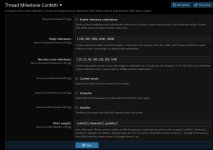
Both lists are editable in the Admin CP (comma-separated), and an empty list disables that trigger.
## Options
Admin CP → Setup → Options → **Thread Milestone Confetti**
- Enable milestone celebrations
- Reply milestones
- Reaction score milestones
- Confetti bursts / Fireworks / Sparkles — one toggle each
- Effect weights — relative pick frequency, 0–20 per effect
## Requirements and installation
- XenForo 2.3.0 or newer
- Any modern browser with canvas support (this is the same technology the rest of your forum uses)
- Admin CP → Add-ons → **Install/upgrade from archive** → `Talmyric-ThreadMilestoneConfetti-1.2.1.zip`
No file edits, no cron entries, no rebuild step, and no external service. It adds one table,
`xf_talmyric_tmc_milestone`, which is dropped when you uninstall.
## Trying it before you install
The add-on ships with a preview page that embeds the real effect script and fires sample reply and
reaction payloads:
```bash
node tools/build-preview.js
```
Open `preview/celebration-preview.html`, use the effect buttons to compare confetti, fireworks and
sparkles, edit the weights box to try another split, and press **Check 24 picks** to see how the
rotation actually distributes.
## Release notes
- **1.2.1** — Fireworks density increased to eleven shells (eight on phones) with a shorter stagger
and a wider spark count.
- **1.2.0** — Fireworks and sparkles effects, per-effect toggles and configurable effect weights.
- **1.0.0** — Reply and reaction milestones, one-shot celebration card, local canvas confetti.
Every forum has them: the thread that quietly rolls past 100 replies, the post that collects its
fiftieth reaction, the milestone nobody notices because it arrives as one more notification among
forty. The number goes up, the page reloads, and the moment is gone.
Thread View Milestone Confetti gives those moments a three-second nod. When a thread reaches a
reply count you care about, or a post reaches a reaction score you care about, the person whose
post crossed the line gets a short celebration on the thread page: a burst of particles across the
screen and a small card that names the milestone. Then it fades, and the forum goes back to being a
forum.
## Three ways to celebrate
One effect is picked per celebration, so a long-running thread does not look the same every time.
| Effect | What you see |
| --- | --- |
| **Confetti** | Paper cannons from both bottom corners plus a centre pop — 68 pieces each side, 44 on phones |
| **Fireworks** | Eleven shells climbing on trails, one every 150 ms, each bursting into a white flash and 32–58 two-tone sparks that hang and fall |
| **Sparkles** | 56 twinkling four-point stars with soft halos, drifting slowly upward |
On phones the counts scale down (eight shells, 34 stars) and the shells launch a little further
apart, so a small screen is busy without being unusable.
## The card
Under the particles sits one card, bottom centre: a headline ("100 replies!"), a line of context,
and a close button. It dismisses itself after seven seconds, or immediately on click or Escape, and
it is announced politely to screen readers as a status message.
## A rotation, not a roulette
Flat randomness produces runs — the same effect three milestones in a row — and runs read as a bug.
Two rules keep it varied:
- an effect is never repeated back-to-back in the same browser session, and
- each effect has a **weight**, so you decide how often it appears.
Weights are relative and written as `effect:weight`, defaulting to `confetti:3, fireworks:2,
sparkles:2`. A weight of 0 removes an effect from the rotation even with its toggle on, and any
effect you omit from the list counts as 1.
## Quiet by design
- **Once per milestone.** A unique key on `(content type, content id, milestone)` means the
hundredth reply is celebrated once, even if several people post at the same instant.
- **Scoped to the person who earned it.** The celebration is queued for the visitor whose action
crossed the line and released only when they open that thread — up to 15 minutes later, if they
wander off first.
- **Only increases count.** Removing a reaction that happens to drop the score onto a milestone does
not trigger anything.
- **Respects reduced motion.** Visitors with `prefers-reduced-motion: reduce` see the card and no
particles.
- **Self-contained.** The effect engine is a single local JavaScript file — no CDN, no third-party
request, no external image or font. The archive is about 14 KB.
- **One template modification, no new templates.** It hooks the `content_top` point in
`thread_view`; the card and particles are built at runtime.
## Defaults
| Trigger | Default milestones |
| --- | --- |
| Thread reply count | 100, 500, 1000, 5000, 10000 |
| Post reaction score | 10, 25, 50, 100, 250, 500, 1000 |
Both lists are editable in the Admin CP (comma-separated), and an empty list disables that trigger.
## Options
Admin CP → Setup → Options → **Thread Milestone Confetti**
- Enable milestone celebrations
- Reply milestones
- Reaction score milestones
- Confetti bursts / Fireworks / Sparkles — one toggle each
- Effect weights — relative pick frequency, 0–20 per effect
## Requirements and installation
- XenForo 2.3.0 or newer
- Any modern browser with canvas support (this is the same technology the rest of your forum uses)
- Admin CP → Add-ons → **Install/upgrade from archive** → `Talmyric-ThreadMilestoneConfetti-1.2.1.zip`
No file edits, no cron entries, no rebuild step, and no external service. It adds one table,
`xf_talmyric_tmc_milestone`, which is dropped when you uninstall.
## Trying it before you install
The add-on ships with a preview page that embeds the real effect script and fires sample reply and
reaction payloads:
```bash
node tools/build-preview.js
```
Open `preview/celebration-preview.html`, use the effect buttons to compare confetti, fireworks and
sparkles, edit the weights box to try another split, and press **Check 24 picks** to see how the
rotation actually distributes.
## Release notes
- **1.2.1** — Fireworks density increased to eleven shells (eight on phones) with a shorter stagger
and a wider spark count.
- **1.2.0** — Fireworks and sparkles effects, per-effect toggles and configurable effect weights.
- **1.0.0** — Reply and reaction milestones, one-shot celebration card, local canvas confetti.


