

- Additional requirements
- Xenforo 2.3+
- Updates duration
- Free
# Staff Action Reason Prompt
A small XenForo 2.3+ add-on that adds an optional public notice prompt when a moderator locks or sticks a thread. If the moderator fills in a notice, it is appended to the bottom of the thread's first post as a styled administrative note.
It supports both places threads are locked or stuck:
- **Thread tools menu** on the thread view (More options → Lock thread / Stick thread).
- **Inline moderation** on forum and thread lists (select threads, choose Lock threads / Stick threads, then Go).
## Features
- **Optional public notice on lock and stick.** Leave the field empty and the action behaves exactly as before.
- **Both moderation entry points.** The thread tools menu (Lock thread / Stick thread) and inline moderation (Lock threads / Stick threads) share the same prompt.
- **One prompt for a whole selection.** Inline moderation asks once and appends the same notice to the first post of every selected thread.
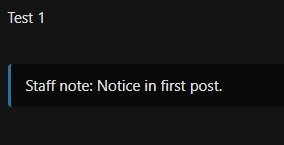
- **Rendered as a callout.** The notice is appended to the bottom of the first post inside a `[STAFFNOTE]` BB code block and displayed as a subtly bordered note.
- **Reversing cleans up.** Unlocking or un-sticking removes the most recent notice from the first post, with no prompt.
- **Themeable with style properties.** Background, border color, border width, border radius, text color, padding and margin live in a dedicated *Staff action notices* style property group and follow style and color variations.
- **Email and text friendly.** HTML email copies keep an inline-styled version of the callout, because email clients do not load forum CSS; plain-text output shows the note text only.
- **Permission aware.** Moderators without the *Edit any post* node permission can still lock and stick; the prompt tells them the notice cannot be added.
- **No schema changes.** Notices are ordinary post content saved through XenForo's post editor service, so they appear in normal edit history.
- **Fully phrased.** Every phrase is namespaced under `talmyric`, so it can be translated without collisions.
## Requirements
- XenForo 2.3.0 or newer
- PHP 8.0+ (whatever your XenForo version requires)
- The moderator needs the *Edit any post* node permission (`editAnyPost`) to add or remove a notice. Without it, the lock/stick still happens, but the notice is unchanged.
## Installation
1. Upload the contents of `_releases/Talmyric-ReasonPrompt-1.4.1.zip` to your forum root, or install the zip through **Admin CP → Add-ons → Install/upgrade from archive**.
2. The add-on works as soon as it is installed. Its appearance is controlled by style properties.
## Upgrading from 1.3.x
Style property customizations are migrated automatically from the old property IDs to the new `talmyric`-prefixed IDs during the upgrade. If the add-on was already upgraded to 1.4.0 before this migration was added, XenForo had already removed the old property rows, so those values cannot be recovered automatically; reapply them under the new properties.
## How it works
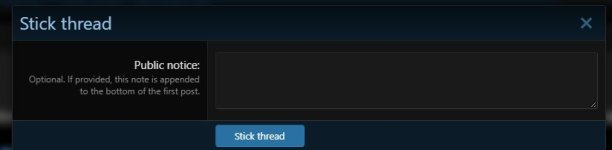
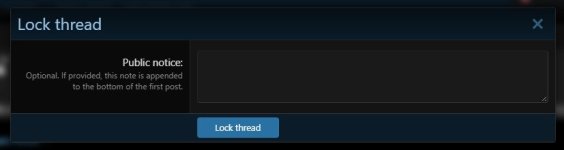
- **Thread tools:** the **Lock thread** and **Stick thread** links open a small overlay instead of acting immediately. The overlay has an optional **Public notice** field. Leave it blank to lock/stick silently as before.
- **Inline moderation:** selecting **Lock threads** or **Stick threads** and pressing **Go** opens the same prompt for the selected threads. The notice entered is appended to the first post of every selected thread.
- When a notice is provided, the add-on appends a `[STAFFNOTE]` BB code block to the first post. The note is rendered as a subtly bordered callout, and the edit is recorded in the post's normal edit history.
- **Unlocking or un-sticking removes the most recent staff notice** from the first post. This happens for both thread tools and inline moderation.
- Locking and sticking still append a notice when a notice is supplied. Unlocking and un-sticking do not ask for a notice; they simply remove the latest one.
- A `[STAFFNOTE]` custom BB code is registered so the note degrades gracefully in emails and text output.
## Styling
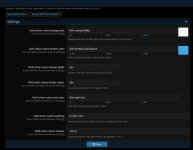
The public callout uses the `staffActionNote` CSS class. Its appearance is editable in **Admin CP → Appearance → Style properties → Staff action notices**:
- Background color
- Border color
- Border width
- Border radius
- Text color
- Padding
- Margin
The styles are applied through a LESS template included from `extra.less`, so they follow the selected style and its color variations. HTML email copies keep equivalent inline styling because email clients do not load forum CSS.
A small XenForo 2.3+ add-on that adds an optional public notice prompt when a moderator locks or sticks a thread. If the moderator fills in a notice, it is appended to the bottom of the thread's first post as a styled administrative note.
It supports both places threads are locked or stuck:
- **Thread tools menu** on the thread view (More options → Lock thread / Stick thread).
- **Inline moderation** on forum and thread lists (select threads, choose Lock threads / Stick threads, then Go).
## Features
- **Optional public notice on lock and stick.** Leave the field empty and the action behaves exactly as before.
- **Both moderation entry points.** The thread tools menu (Lock thread / Stick thread) and inline moderation (Lock threads / Stick threads) share the same prompt.
- **One prompt for a whole selection.** Inline moderation asks once and appends the same notice to the first post of every selected thread.
- **Rendered as a callout.** The notice is appended to the bottom of the first post inside a `[STAFFNOTE]` BB code block and displayed as a subtly bordered note.
- **Reversing cleans up.** Unlocking or un-sticking removes the most recent notice from the first post, with no prompt.
- **Themeable with style properties.** Background, border color, border width, border radius, text color, padding and margin live in a dedicated *Staff action notices* style property group and follow style and color variations.
- **Email and text friendly.** HTML email copies keep an inline-styled version of the callout, because email clients do not load forum CSS; plain-text output shows the note text only.
- **Permission aware.** Moderators without the *Edit any post* node permission can still lock and stick; the prompt tells them the notice cannot be added.
- **No schema changes.** Notices are ordinary post content saved through XenForo's post editor service, so they appear in normal edit history.
- **Fully phrased.** Every phrase is namespaced under `talmyric`, so it can be translated without collisions.
## Requirements
- XenForo 2.3.0 or newer
- PHP 8.0+ (whatever your XenForo version requires)
- The moderator needs the *Edit any post* node permission (`editAnyPost`) to add or remove a notice. Without it, the lock/stick still happens, but the notice is unchanged.
## Installation
1. Upload the contents of `_releases/Talmyric-ReasonPrompt-1.4.1.zip` to your forum root, or install the zip through **Admin CP → Add-ons → Install/upgrade from archive**.
2. The add-on works as soon as it is installed. Its appearance is controlled by style properties.
## Upgrading from 1.3.x
Style property customizations are migrated automatically from the old property IDs to the new `talmyric`-prefixed IDs during the upgrade. If the add-on was already upgraded to 1.4.0 before this migration was added, XenForo had already removed the old property rows, so those values cannot be recovered automatically; reapply them under the new properties.
## How it works
- **Thread tools:** the **Lock thread** and **Stick thread** links open a small overlay instead of acting immediately. The overlay has an optional **Public notice** field. Leave it blank to lock/stick silently as before.
- **Inline moderation:** selecting **Lock threads** or **Stick threads** and pressing **Go** opens the same prompt for the selected threads. The notice entered is appended to the first post of every selected thread.
- When a notice is provided, the add-on appends a `[STAFFNOTE]` BB code block to the first post. The note is rendered as a subtly bordered callout, and the edit is recorded in the post's normal edit history.
- **Unlocking or un-sticking removes the most recent staff notice** from the first post. This happens for both thread tools and inline moderation.
- Locking and sticking still append a notice when a notice is supplied. Unlocking and un-sticking do not ask for a notice; they simply remove the latest one.
- A `[STAFFNOTE]` custom BB code is registered so the note degrades gracefully in emails and text output.
## Styling
The public callout uses the `staffActionNote` CSS class. Its appearance is editable in **Admin CP → Appearance → Style properties → Staff action notices**:
- Background color
- Border color
- Border width
- Border radius
- Text color
- Padding
- Margin
The styles are applied through a LESS template included from `extra.less`, so they follow the selected style and its color variations. HTML email copies keep equivalent inline styling because email clients do not load forum CSS.


