
- Additional requirements
- XenForo 2.3+
- Updates duration
- $49.95 - 1 year ($24.95 yearly renewal)
Full Feature Overview · Version 1.25.0
A standalone property listing add-on for the XenForo 2.3 series, supporting private sellers, members and agents. Resource Manager and Media Gallery are not required.Property listings
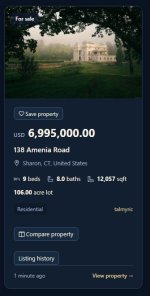
Create and manage properties for sale or rent, with Available, Sold and Rented statuses.Each listing supports:
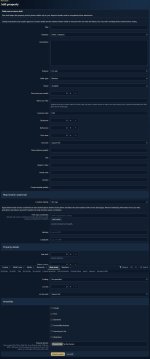
- Title and property description.
- Price and currency.
- Street address, city, state/region, postal code and country.
- Public seller contact information.
- Bedrooms, bathrooms and floor area.
- Year built and parking spaces.
- Lot size and measurement unit.
- Heating and cooling details.
- Garage, pool, basement, accessibility, fenced yard and waterfront amenities.
- Photos, image floor plans, PDF floor plans and hosted video tours.
- Additional administrator-defined property fields.
Categories and custom fields
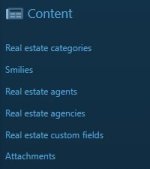
Organize listings into administrator-managed categories, including Residential, Commercial and Land. Category profiles hide property inputs that do not apply.Custom fields support:
- Single-line and multi-line text.
- Rich BB code text.
- Numbers.
- Drop-down selections and radio buttons.
- Single checkboxes and checkbox groups.
- Multiple-choice selections.
- Star ratings.
Eligible fields can appear in directory filters and property comparisons. Validation options include maximum lengths and applicable XenForo matching rules, such as email, URL, number, date and regular expressions.
Private drafts
Members can save unfinished properties and return through My drafts.- Save incomplete listing information and photos.
- Complete required information before submission.
- Keep drafts out of public search, maps and alerts.
- Restrict draft access to the author, including drafts in Trash.
- Begin the expiration period when the property is published.
Photos and galleries
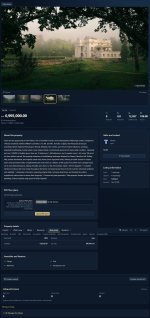
Present properties with a cover image, gallery thumbnails and full-size image viewing.- Upload multiple JPEG, PNG or WebP images.
- Choose the cover photo.
- Reorder images with drag-and-drop or accessible move controls.
- Add captions.
- Separate property photos from image floor plans.
- Serve stored images through permission-checked routes.
PDF floor plans and video tours
PDF floor plans can be uploaded from a saved listing’s detail page.- Up to 10 PDFs per listing.
- Maximum 20 MiB per file.
- Separate allowance from property images.
- Private storage and permission-checked downloads.
Video tours support YouTube and standard Vimeo video links, with click-to-load embeds and provider fallback links. Direct video uploads, transcoding and arbitrary video providers are not included.
Property search
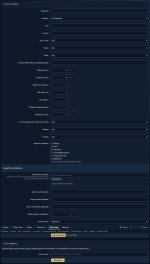
The property directory includes filters for:- Keywords in titles and descriptions.
- Category and location.
- Sale or rent.
- Availability and seller type.
- Currency and price range.
- Bedrooms, year built and parking.
- Lot-size unit and minimum size.
- Heating, cooling and amenities.
- Eligible custom property fields.
- Optional distance/radius searches.
XenForo global search
Properties integrate with XenForo’s native search system.- Search public, unexpired listings.
- Include title, description and location information.
- Check listing visibility when displaying results.
- Support native search rebuilding.
Maps and location privacy
Optional maps help members explore property locations.- Property-detail and directory maps.
- Manual latitude and longitude entry.
- Optional Geoapify location lookup.
- Exact, approximate or no-map location settings.
- Click-to-load external maps.
Basic listings do not require a map service. External map and lookup availability depends on the configured providers.
Favorites and saved searches
Members can maintain a private property shortlist through My favorites.- Save and remove properties.
- Enable price-drop alerts.
- Enable status-change alerts.
- Retain saved properties while temporarily hidden or expired.
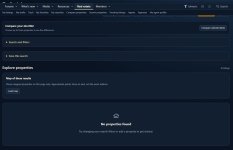
Property comparisons
Compare up to three properties side by side.- Compare standard property information.
- Include enabled custom fields.
- Show differences only.
- Respect category-specific field applicability.
- Use horizontal scrolling on smaller screens.
Seller inquiries
Members can contact sellers through XenForo conversations, subject to native conversation permissions and recipient privacy settings.Listings can also display public contact information. A separate external email messaging system is not included.
Agents and agencies
Agent profiles support:- Display name and biography.
- Service area.
- Contact information and website.
- Administrator-assigned verification badges.
Verification badges are assigned by administrators. Agency membership groups profiles but does not grant shared listing-editing rights or agency staff roles.
Approvals and moderation
A dedicated Approvals page provides listing review controls.- Approve submissions.
- Reject listings with a private reason.
- Remove listings from public view.
- Notify owners through native alerts.
- Restrict unpublished ordinary listings to owners and authorized moderators.
Property reporting integrates with the XenForo report center. Listing moderation uses the add-on’s dedicated interface rather than the native combined approval queue.
Alerts and notification preferences
Seven alert types appear in native account preferences:- Property price drops.
- Property status changes.
- Saved-search matches.
- Listing approval.
- Listing rejection.
- Listing removal.
- Approaching expiration.
Price/status alerts exclude the listing owner and require an eligible public, unexpired property. Changes are checked periodically, so intermediate edits can be consolidated into the final observed value. Delivery depends on XenForo’s job runner.
Expiration and renewal
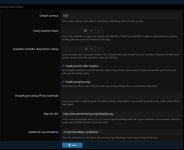
Administrators can configure listing duration and reminder windows.- Default listing duration: 30 days.
- Configurable duration: 0–3650 days.
- A duration of 0 disables expiration.
- Reminder window: 0–365 days.
- A reminder window of 0 disables reminders and early renewal.
Private listing statistics
Owners and authorized moderators can view:- Property page views.
- Current saves.
- Inquiries.
Trash and restoration
Deleting a listing first moves it to private Trash, retaining its details, media, favorites and core history.- Restore ordinary listings to Pending approval.
- Restore drafts to private editing.
- Permanently delete through a separate confirmation.
- Keep Trash until someone explicitly removes its contents.
Private listing history
A private timeline records core listing actions and changes, including:- Creation and draft updates.
- Submission and publication.
- Approval, rejection and removal.
- Renewal.
- Trash and restoration.
- Price, currency, purpose and status changes.
- Actor and time information.
Permissions and administration
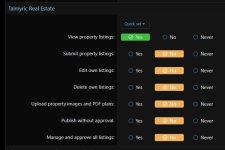
Seven public permissions control access:- View.
- Submit.
- Edit own.
- Delete own.
- Upload property images and PDF plans.
- Publish without approval.
- Manage and approve all listings.
Permissions are not granted automatically. Administrator status alone does not grant public listing access. Category-level permissions and agency team editing are not included.
Installation and compatibility
Install or upgrade through XenForo’s Add-ons interface after uploading the release files. The package includes installation, upgrade, permission, compatibility and FAQ guides.Compatibility target: XenForo 2.3.0 and later within the 2.3 series.
The stabilization audit used XenForo 2.3.13, PHP 8.3.28, MariaDB 10.4.32 and local Chrome/Chromium fixtures.
The release completed 1,376 checks, including isolated installation, repeated upgrades, selected older-version upgrades, database transactions and draft/Trash workflows.
Earlier XenForo/PHP versions and every browser, style or add-on combination were not separately runtime-tested. No XenForo 2.4 or 3.x compatibility claim is made.