

- Additional requirements
- XenForo Media Gallery 2.3.13
- Updates duration
- Free
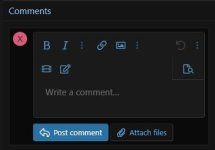
Bring XenForo’s forum-style Attach files button to Media Gallery comments. Members can share a follow-up photo, a PDF, or another allowed file directly in the comment.

Features
- Attach files to media and album comments. The button appears in quick reply, the full comment form, the edit form, and the media lightbox.
- Use the familiar XenForo uploader. Add multiple files, remove uploads, and insert attachments inline using the standard editor controls.
- Show files below the comment. Attachments that aren’t inserted inline appear in an attachment list beneath the comment.
- Preview and resume drafts. Preview inline attachments before posting and recover pending uploads when you return to a saved comment draft.
- Control uploads with gallery permissions. Set separate permissions for attaching files and uploading videos. Downloads follow the visibility rules of the comment and its parent media item or album.
- Reuse your site’s attachment settings. Allowed file types, file size, image dimensions, and the per-comment attachment limit follow XenForo’s attachment settings.


