

- Additional requirements
- XenForo 2.3.13 or later,
XenForo Resource Manager 2.3.13 or later,
and PHP 8.0 or later.
- Updates duration
- $9.95 - 1 year ($4.95 yearly renewal)
Add a comment section directly to XenForo Resource Manager description pages. Members can start a conversation without leaving the resource.
- Individual comment cards with avatars, timestamps, and a visible comment count.
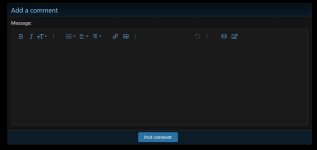
- A rich text editor, single-comment Quote / Reply, and native reactions.
- Alerts for new comments on your resources, quotes, mentions, and reactions.
- Permission-based editing and deletion, native reporting, and per-resource comment locks.
1. In the Admin control panel, go to **Add-ons → Install/upgrade from archive** and select the release ZIP.
2. If archive installation is unavailable, extract the ZIP, copy the **contents** of the `upload/` folder into your forum root, then install or upgrade **Talmyric Resource Comments** from **Add-ons**.
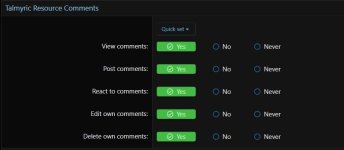
3. Go to **Groups & permissions → User group permissions**. Under **Talmyric Resource Comments**, grant **View comments** to groups that should see the section and **Post comments** to groups that should participate. Grant **React to comments**, **Edit own comments**, and **Delete own comments** as appropriate.
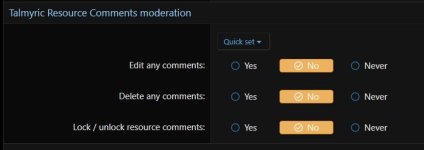
4. Under **Talmyric Resource Comments moderation**, grant **Edit any comments**, **Delete any comments**, or **Lock / unlock resource comments** to the appropriate staff. XenForo moderators who can edit or delete any resource in a category can also lock or unlock comments there.
5. Open a resource's description page and look for **Comments**. No widget setup is needed.
Add-on permissions default to unset. Administrators still need the relevant permissions. Comment access also follows Resource Manager's category, resource, and full-description permissions.
## Upgrade
Install the new ZIP over the existing add-on. Do not uninstall first. Upgrading from 1.2.0 keeps comments, reactions, permissions, and resource locks. Version 1.2.1 updates the documentation only.
## Uninstall
Uninstalling removes the add-on's comments, reactions, alerts, and lock settings. Back up the database first if you need to retain them.

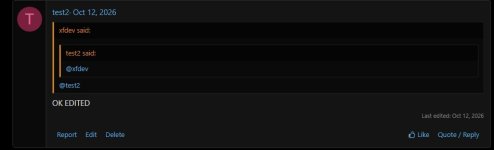
- Individual comment cards with avatars, timestamps, and a visible comment count.
- A rich text editor, single-comment Quote / Reply, and native reactions.
- Alerts for new comments on your resources, quotes, mentions, and reactions.
- Permission-based editing and deletion, native reporting, and per-resource comment locks.
1. In the Admin control panel, go to **Add-ons → Install/upgrade from archive** and select the release ZIP.
2. If archive installation is unavailable, extract the ZIP, copy the **contents** of the `upload/` folder into your forum root, then install or upgrade **Talmyric Resource Comments** from **Add-ons**.
3. Go to **Groups & permissions → User group permissions**. Under **Talmyric Resource Comments**, grant **View comments** to groups that should see the section and **Post comments** to groups that should participate. Grant **React to comments**, **Edit own comments**, and **Delete own comments** as appropriate.
4. Under **Talmyric Resource Comments moderation**, grant **Edit any comments**, **Delete any comments**, or **Lock / unlock resource comments** to the appropriate staff. XenForo moderators who can edit or delete any resource in a category can also lock or unlock comments there.
5. Open a resource's description page and look for **Comments**. No widget setup is needed.
Add-on permissions default to unset. Administrators still need the relevant permissions. Comment access also follows Resource Manager's category, resource, and full-description permissions.
## Upgrade
Install the new ZIP over the existing add-on. Do not uninstall first. Upgrading from 1.2.0 keeps comments, reactions, permissions, and resource locks. Version 1.2.1 updates the documentation only.
## Uninstall
Uninstalling removes the add-on's comments, reactions, alerts, and lock settings. Back up the database first if you need to retain them.


