

- Additional requirements
- For XenForo 2.3.x · Minimum XenForo 2.3.0
- Updates duration
- $9.95 - 1 year ($4.95 yearly renewal)
Scheduled absences, automatic replies, and clear communication for your community.
Give staff a simple way to announce when they’re unavailable—and help members find the information they need while waiting for a response.
Designed for XenForo 2.3.x, with a minimum requirement of XenForo 2.3.0.
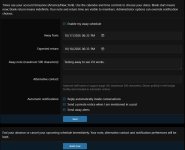
Schedule an absence with calendar and time controls, start immediately, or leave your return date open-ended. Away status automatically ends at the expected return time.
Coming back early? Click Back now to end your absence or cancel an upcoming schedule. Your note, alternative contact, and notification preferences are retained.
Leave an away message and provide an alternative staff contact or support page so members know what to expect and where to turn.
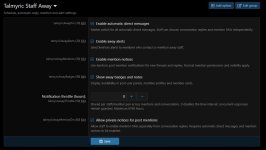
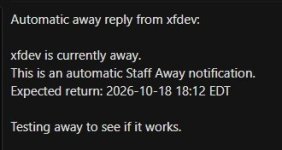
Send automatic replies inside new and existing conversations when members contact unavailable staff. Incoming messages remain unread for the away staff member.
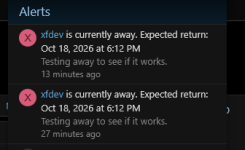
Members who mention away staff in a thread or reply can receive a private notice, a native XenForo alert, or both.
Control conversation replies, mention DMs, and away alerts separately. Administrators can also enable or disable notification features globally.
A shared throttle limits repeat notifications for each staff/member pair across conversations and mentions. The default interval is 24 hours, with an administrator-configurable setting.
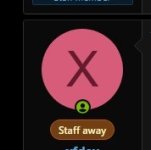
A centered Staff away badge shows availability without filling the user panel with text. Hover, focus, or tap to view the away message, alternative contact, and expected return.
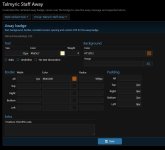
Customize badge colors, text, borders, rounded corners, padding, and additional CSS through Style properties → Talmyric Staff Away.
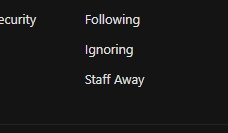
Authorized staff receive a Staff Away link in their account menu. Access requires both XenForo’s staff display setting and the add-on’s management permission.

Give staff a simple way to announce when they’re unavailable—and help members find the information they need while waiting for a response.
Designed for XenForo 2.3.x, with a minimum requirement of XenForo 2.3.0.
Features
 Plan your time away
Schedule an absence with calendar and time controls, start immediately, or leave your return date open-ended. Away status automatically ends at the expected return time. Return with one click
Coming back early? Click Back now to end your absence or cancel an upcoming schedule. Your note, alternative contact, and notification preferences are retained. Keep members informed
Leave an away message and provide an alternative staff contact or support page so members know what to expect and where to turn. Reply automatically
Send automatic replies inside new and existing conversations when members contact unavailable staff. Incoming messages remain unread for the away staff member. Respond to post mentions
Members who mention away staff in a thread or reply can receive a private notice, a native XenForo alert, or both. Choose how you notify
Control conversation replies, mention DMs, and away alerts separately. Administrators can also enable or disable notification features globally. Prevent repetitive notices
A shared throttle limits repeat notifications for each staff/member pair across conversations and mentions. The default interval is 24 hours, with an administrator-configurable setting. Keep profiles tidy
A centered Staff away badge shows availability without filling the user panel with text. Hover, focus, or tap to view the away message, alternative contact, and expected return. Match your forum’s style
Customize badge colors, text, borders, rounded corners, padding, and additional CSS through Style properties → Talmyric Staff Away. Control access
Authorized staff receive a Staff Away link in their account menu. Access requires both XenForo’s staff display setting and the add-on’s management permission.


