

- Additional requirements
- XenForo 2.3.13
XenForo Media Gallery 2.3.13
- Updates duration
- $9.95 - 1 year ($4.95 yearly renewal)
## Features
- Dedicated, administrator-configured absolute import root and relative folder selection.
- Optional subfolder scanning; images only, videos only, or both.
- Gallery category selection, default category, title patterns (`{filename}` and `{n}`), and a shared description.
- Optional per-file CSV metadata, with a global switch to disable it.
- Downloadable blank CSV template and folder CSV with filenames already filled in.
- Scan-and-preview workflow showing file counts, sizes, initial eligibility and effective metadata before confirmation.
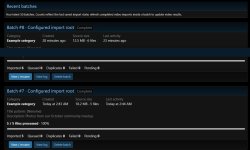
- Recent batch cards, batch details, progress counters and per-file results.
- Manual processing, continuous browser runs and a CLI runner; resume interrupted batches and retry failed files.
- Configurable delay and file count per continuous run.
- Separate Cancel and Delete actions. Cancellation stops future file selection while preserving history; deletion removes batch history. Neither removes imported media or FTP originals.
- Native XFMG video transcoding with waiting, converting, completed, failed and unknown status reporting where available.
- Filename search, status filters, paginated logs and downloadable CSV logs.
- SHA-256 duplicate protection across this add-on's batches, including renamed copies and queued videos.
- Disk-space checks with configurable reserve and working-space multiplier; insufficient detected capacity pauses processing.
- Optional completed-history retention through XenForo's scheduled tasks.
- Administrative access controls, gallery/category permission checks, path containment, link rejection, file validation and protected temporary staging.
## Requirements
- Licensed XenForo 2.3.13 and XFMG 2.3.13 installations. Neither product is included.
- PHP 8.0 or later, plus the extensions and configuration required by your XenForo/XFMG installation.
- A dedicated import folder readable by PHP, outside the XenForo installation and preferably outside the public web root.
- Enough temporary and gallery storage for staging, attachments and video processing.
- Working XFMG video/FFmpeg configuration if importing videos that require conversion.
Shared hosting and dedicated servers are supported when these requirements are met. Host quotas, filesystem restrictions and execution limits still apply. Disk capacity detection may be unavailable or may not reflect account quotas on some hosts.
## Install or upgrade
1. Back up the forum database and files. Test on a staging forum first.
2. Extract this ZIP. Upload the **contents of `upload/`** into your XenForo installation, merging folders.
3. Open **Admin CP → Add-ons** and install or upgrade **Talmyric Server Media Import**.
4. Under **Groups & permissions → Administrators**, edit the importing administrator and allow **Import server media** and the existing media gallery administration permission.
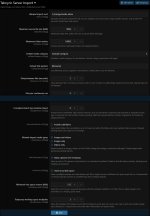
5. Open **Setup → Options → Talmyric Server Import** and set the allowed import root to its full server filesystem path, for example `/home/account/media-inbox` or `C:\media-inbox`. An FTP-visible path may differ from the real filesystem path.
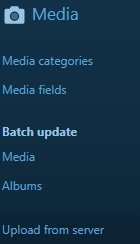
6. Open **Upload from server** in the Admin CP navigation. This tool is an admin page; it does not add a public gallery upload button.
The importing account also needs normal gallery permissions to view the destination category, add media and upload the selected media types. Administrator access alone does not grant those permissions.
### CSV tagging permissions
CSV tags use XFMG's existing content-tag permissions. Enable XenForo content tagging, then grant the importing account **Tag own media items** in media gallery user-group permissions. Check the destination's **Media category permissions** for restrictive overrides. Existing **Tag any media items** or **Manage any tags** permissions can also satisfy XFMG's tag-edit check. Leave CSV tags blank if tagging is not needed.
## Import workflow
1. Upload originals into the dedicated folder. Finish transfers and wait at least 60 seconds before importing.
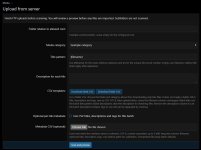
2. Choose the relative folder and gallery category. Set the title pattern and shared description.
3. Optionally download a CSV template, fill it in and save as **CSV UTF-8 (comma delimited)**. Enable the per-file metadata checkbox and select the completed CSV.
4. Click **Scan and preview**. Review file eligibility, CSV matches and disk-space results, then confirm.
5. Run the batch and check the file log. Queued videos need XFMG's native processing to finish; refresh their status after processing.
For CLI processing of an existing confirmed batch, run from the XenForo folder:
```text
php cmd.php talmyric:import-run BATCH_ID
```
Run the same command to resume. Resumption is per file; an interrupted individual file may be staged again.
## CSV format
`filename` is required. Optional columns are `title`, `description` and `tags`. Maximum upload size is 5 MiB, with up to 100,000 data rows, subject to scan limits.
- Filenames include extensions and are relative to the selected import folder. Keep generated filenames unchanged, including their harmless `./` prefix.
- Blank titles inherit the batch title pattern. Nonblank CSV titles are literal text.
- **Blank description cells clear the description.** Remove the whole description column to inherit the shared batch description.
- Tags can be separated by commas inside one quoted CSV cell. Blank tags apply no tags.
- Files with no matching CSV row use batch defaults. Duplicate CSV filenames block confirmation; unmatched rows are reported.
`metadata-example.csv` provides an example. Blank template downloads contain headers only; add at least one filename before uploading.
## Settings
The options group contains 14 settings: allowed import root, maximum source size, maximum folder entries, default category, default title pattern, delay between files, files per continuous run, completed log retention, subfolder scanning, media types, optional CSV metadata, disk-space checks, disk reserve and working-space multiplier.
## Behavior and limits
- Source files are never deleted, moved or renamed. Keep originals until gallery imports and video conversions are verified.
- Duplicate detection covers files imported through this add-on, not existing media uploaded through other tools. The same content selected for another category is still a duplicate.
- Native gallery quotas, moderation, file validation and required fields remain in force.
- A file already processing can finish after cancellation. Native video jobs already queued continue independently.
- Large files must fit the host's time and storage limits. CLI processing avoids browser request limits but still depends on PHP, storage and native XFMG processing.
- Free-space checks are estimates, not reservations or guarantees against concurrent disk use.
- Uninstalling removes the import journal and duplicate history, while keeping gallery media and source files. Export needed logs first.
- Dedicated, administrator-configured absolute import root and relative folder selection.
- Optional subfolder scanning; images only, videos only, or both.
- Gallery category selection, default category, title patterns (`{filename}` and `{n}`), and a shared description.
- Optional per-file CSV metadata, with a global switch to disable it.
- Downloadable blank CSV template and folder CSV with filenames already filled in.
- Scan-and-preview workflow showing file counts, sizes, initial eligibility and effective metadata before confirmation.
- Recent batch cards, batch details, progress counters and per-file results.
- Manual processing, continuous browser runs and a CLI runner; resume interrupted batches and retry failed files.
- Configurable delay and file count per continuous run.
- Separate Cancel and Delete actions. Cancellation stops future file selection while preserving history; deletion removes batch history. Neither removes imported media or FTP originals.
- Native XFMG video transcoding with waiting, converting, completed, failed and unknown status reporting where available.
- Filename search, status filters, paginated logs and downloadable CSV logs.
- SHA-256 duplicate protection across this add-on's batches, including renamed copies and queued videos.
- Disk-space checks with configurable reserve and working-space multiplier; insufficient detected capacity pauses processing.
- Optional completed-history retention through XenForo's scheduled tasks.
- Administrative access controls, gallery/category permission checks, path containment, link rejection, file validation and protected temporary staging.
## Requirements
- Licensed XenForo 2.3.13 and XFMG 2.3.13 installations. Neither product is included.
- PHP 8.0 or later, plus the extensions and configuration required by your XenForo/XFMG installation.
- A dedicated import folder readable by PHP, outside the XenForo installation and preferably outside the public web root.
- Enough temporary and gallery storage for staging, attachments and video processing.
- Working XFMG video/FFmpeg configuration if importing videos that require conversion.
Shared hosting and dedicated servers are supported when these requirements are met. Host quotas, filesystem restrictions and execution limits still apply. Disk capacity detection may be unavailable or may not reflect account quotas on some hosts.
## Install or upgrade
1. Back up the forum database and files. Test on a staging forum first.
2. Extract this ZIP. Upload the **contents of `upload/`** into your XenForo installation, merging folders.
3. Open **Admin CP → Add-ons** and install or upgrade **Talmyric Server Media Import**.
4. Under **Groups & permissions → Administrators**, edit the importing administrator and allow **Import server media** and the existing media gallery administration permission.
5. Open **Setup → Options → Talmyric Server Import** and set the allowed import root to its full server filesystem path, for example `/home/account/media-inbox` or `C:\media-inbox`. An FTP-visible path may differ from the real filesystem path.
6. Open **Upload from server** in the Admin CP navigation. This tool is an admin page; it does not add a public gallery upload button.
The importing account also needs normal gallery permissions to view the destination category, add media and upload the selected media types. Administrator access alone does not grant those permissions.
### CSV tagging permissions
CSV tags use XFMG's existing content-tag permissions. Enable XenForo content tagging, then grant the importing account **Tag own media items** in media gallery user-group permissions. Check the destination's **Media category permissions** for restrictive overrides. Existing **Tag any media items** or **Manage any tags** permissions can also satisfy XFMG's tag-edit check. Leave CSV tags blank if tagging is not needed.
## Import workflow
1. Upload originals into the dedicated folder. Finish transfers and wait at least 60 seconds before importing.
2. Choose the relative folder and gallery category. Set the title pattern and shared description.
3. Optionally download a CSV template, fill it in and save as **CSV UTF-8 (comma delimited)**. Enable the per-file metadata checkbox and select the completed CSV.
4. Click **Scan and preview**. Review file eligibility, CSV matches and disk-space results, then confirm.
5. Run the batch and check the file log. Queued videos need XFMG's native processing to finish; refresh their status after processing.
For CLI processing of an existing confirmed batch, run from the XenForo folder:
```text
php cmd.php talmyric:import-run BATCH_ID
```
Run the same command to resume. Resumption is per file; an interrupted individual file may be staged again.
## CSV format
`filename` is required. Optional columns are `title`, `description` and `tags`. Maximum upload size is 5 MiB, with up to 100,000 data rows, subject to scan limits.
- Filenames include extensions and are relative to the selected import folder. Keep generated filenames unchanged, including their harmless `./` prefix.
- Blank titles inherit the batch title pattern. Nonblank CSV titles are literal text.
- **Blank description cells clear the description.** Remove the whole description column to inherit the shared batch description.
- Tags can be separated by commas inside one quoted CSV cell. Blank tags apply no tags.
- Files with no matching CSV row use batch defaults. Duplicate CSV filenames block confirmation; unmatched rows are reported.
`metadata-example.csv` provides an example. Blank template downloads contain headers only; add at least one filename before uploading.
## Settings
The options group contains 14 settings: allowed import root, maximum source size, maximum folder entries, default category, default title pattern, delay between files, files per continuous run, completed log retention, subfolder scanning, media types, optional CSV metadata, disk-space checks, disk reserve and working-space multiplier.
## Behavior and limits
- Source files are never deleted, moved or renamed. Keep originals until gallery imports and video conversions are verified.
- Duplicate detection covers files imported through this add-on, not existing media uploaded through other tools. The same content selected for another category is still a duplicate.
- Native gallery quotas, moderation, file validation and required fields remain in force.
- A file already processing can finish after cancellation. Native video jobs already queued continue independently.
- Large files must fit the host's time and storage limits. CLI processing avoids browser request limits but still depends on PHP, storage and native XFMG processing.
- Free-space checks are estimates, not reservations or guarantees against concurrent disk use.
- Uninstalling removes the import journal and duplicate history, while keeping gallery media and source files. Export needed logs first.


